CCA Online Tools
Dynamic Sun Elevation Configuration
🌍 The Problem
Fixed sun elevation thresholds don’t work optimally throughout the year due to Earth’s axial tilt and orbital motion:
Winter Issues:
- Sun reaches lower maximum elevation
- Fixed summer thresholds may never trigger
- Covers stay closed too long
Summer Issues:
- Sun reaches higher maximum elevation
- Fixed winter thresholds trigger too early
- Covers open/close at wrong times
Daylight Saving Time:
- Clock shifts by 1 hour
- Sun position unchanged
- Manual threshold adjustments needed twice per year
✨ The Solution
Template sensors with sinusoidal interpolation automatically adapt thresholds based on the current date, matching the Earth’s actual solar cycle.
How the Sensors Work
The sensors provide dynamic threshold values that change throughout the year:
- Opening Sensor: Provides the minimum sun elevation required for opening
- Cover opens when current sun elevation rises above this threshold
- Higher values = later opening (sun must climb higher)
- Closing Sensor: Provides the maximum sun elevation allowed before closing
- Cover closes when current sun elevation falls below this threshold
- Higher values = later closing (sun can set further)
Example scenario (Berlin, 52°N):
- Summer solstice (June 21): Opening sensor = -1.6°, Closing sensor = -0.6°
- Winter solstice (Dec 21): Opening sensor = 5.4°, Closing sensor = 2.4°
- Result: Covers open earlier and close later in summer (long day), open later and close earlier in winter (short day)
Visual Comparison
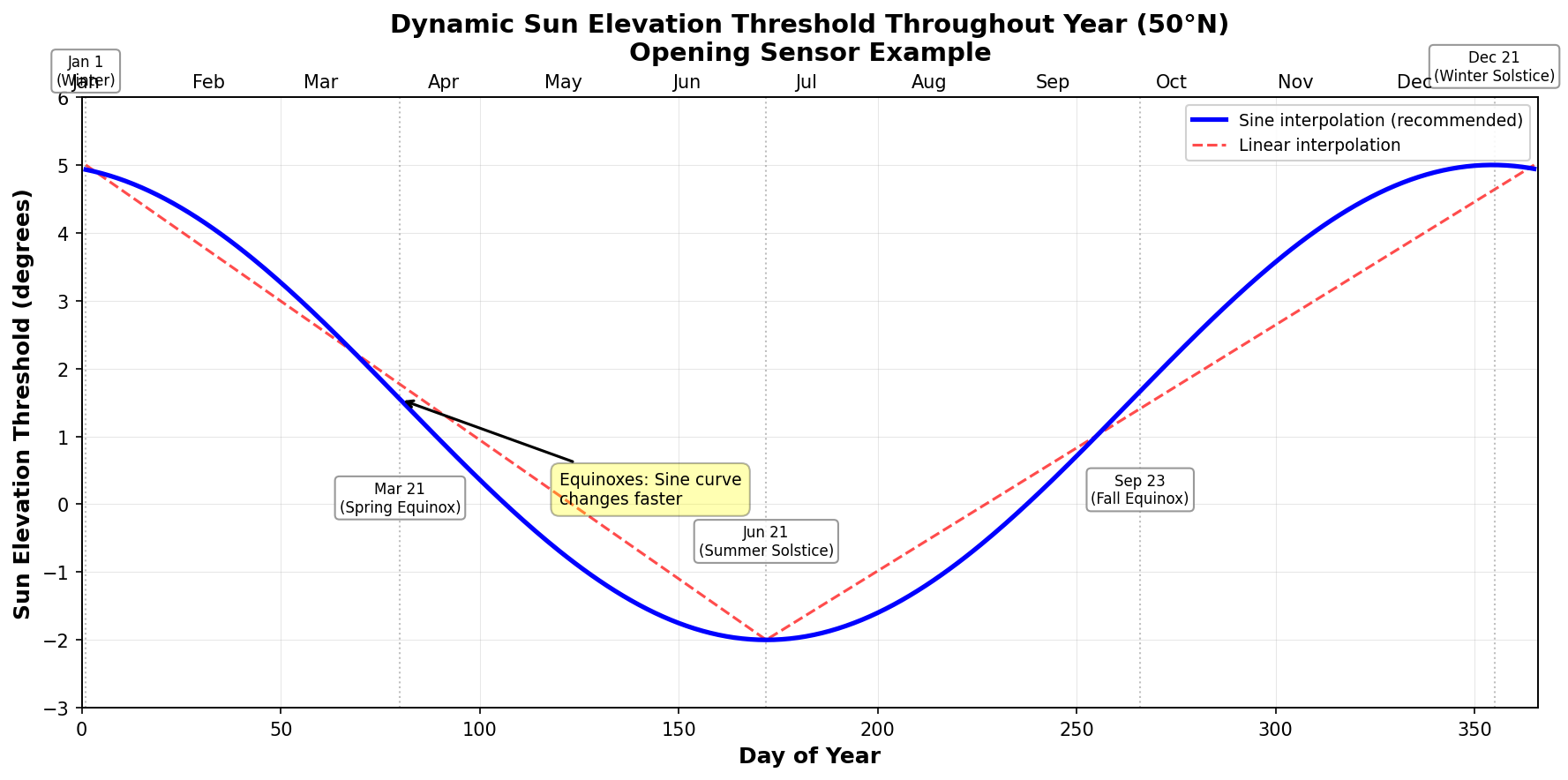
The graph above shows how the dynamic sun elevation threshold changes throughout the year, comparing sinusoidal interpolation (recommended) with linear interpolation.
ASCII version (click to expand)
``` Sun Elevation Threshold Throughout Year (50°N) 6° ┤╲ ╱ │ ╲ ╱ 4° ┤ ╲ ╲─────────────────────────╱ ╱ │ ╲ ╲ ╱ ╱ 2° ┤ ╲ ╲ ← Spring/Autumn: ╱ ╱ Linear │ ╲ ╲ Sine changes ╱ ╱─╲ 0° ┤ ╲ ╲ faster! ╱ ╱ ╲ │ ╲ ╲ ╱╱ ╲ -2° ┤ ╲ ╰─Sine curve─╯╱ ╲ │ ╲ ╱ ╲ -4° ┼──┬────┬──┴─────────────────┴────┬────┬─── Jan Mar May Jul Sep Nov Jan ↑ ↑ Equinox Equinox (faster) (faster) Solstice → Jun/Dec ← Solstice (slower) ```Why Sine is Better:
- 📈 Physically accurate - matches Earth’s declination cycle
- 🔄 Smooth transitions - no abrupt changes at solstices
- ⚡ Realistic speed - faster changes in spring/autumn, slower in summer/winter
- 💯 More accurate - ±0.5° vs ±1° with linear interpolation
🚀 Quick Setup (5 Minutes)
Step 1: Add Template Sensors
Add this to your configuration.yaml or create a new file in packages/:
template:
  - trigger:
      - trigger: time
        at: "00:01:00"
      - platform: event
        event_type:
          - homeassistant_started
    sensor:
      # ========================================
      # Dynamic Sun Elevation - Opening
      # ========================================
      - name: "Sun Elevation Up Dynamic"
        unique_id: sun_elevation_up_dynamic
        unit_of_measurement: "°"
        icon: mdi:weather-sunset-up
        state: >
          {% set day = now().timetuple().tm_yday %}
          {% set lat = state_attr('zone.home', 'latitude') | float(52.0) %}

          {# Reference values for 50°N #}
          {% set summer = -2.0 %}
          {% set winter = 5.0 %}

          {# Sinusoidal interpolation (physically correct) #}
          {# Day 80.75 ≈ March 21 (spring equinox) as reference #}
          {% set seasonal_factor = sin(2 * pi * (day - 80.75) / 365) %}
          {% set base = winter + (summer - winter) * (seasonal_factor + 1) / 2 %}

          {# Latitude adjustment: ±0.2° per degree from 50°N #}
          {% set adjustment = (lat - 50) * 0.2 %}
          {% set final = base + adjustment %}

          {{ final | round(1) }}

      # ========================================
      # Dynamic Sun Elevation - Closing
      # ========================================
      - name: "Sun Elevation Down Dynamic"
        unique_id: sun_elevation_down_dynamic
        unit_of_measurement: "°"
        icon: mdi:weather-sunset-down
        state: >
          {% set day = now().timetuple().tm_yday %}
          {% set lat = state_attr('zone.home', 'latitude') | float(52.0) %}

          {# Reference values for 50°N #}
          {% set summer = -1.0 %}
          {% set winter = 2.0 %}

          {# Sinusoidal interpolation (physically correct) #}
          {% set seasonal_factor = sin(2 * pi * (day - 80.75) / 365) %}
          {% set base = winter + (summer - winter) * (seasonal_factor + 1) / 2 %}

          {# Latitude adjustment #}
          {% set adjustment = (lat - 50) * 0.2 %}
          {% set final = base + adjustment %}

          {{ final | round(1) }}
Step 2: Restart Home Assistant
Settings → System → Restart
Step 3: Verify Sensors
Developer Tools → States → Search for:
sensor.sun_elevation_up_dynamicsensor.sun_elevation_down_dynamic
Both should show numeric values (e.g., 2.3)
Step 4: Configure CCA Blueprint
In your CCA automation configuration:
- Navigate to Sun Elevation Settings section
- Find the new Dynamic Sensor fields:
- ☀️ Sun Elevation Up Sensor (Dynamic): Select
sensor.sun_elevation_up_dynamic - ☀️ Sun Elevation Down Sensor (Dynamic): Select
sensor.sun_elevation_down_dynamic
- ☀️ Sun Elevation Up Sensor (Dynamic): Select
- Save automation
Done! 🎉 Your covers now adapt automatically to seasons.
⚠️ Common Mistake: Inverted Values
CRITICAL: Make sure your summer and winter values are NOT inverted!
Many users initially configure these values backwards. Here’s how to verify you have them correct:
✅ Correct Configuration
Opening sensor (Sun Elevation Up Dynamic):
{% set summer = -2.0 %}  # ✅ LOWER value for summer (opens EARLIER)
{% set winter = 5.0 %}   # ✅ HIGHER value for winter (opens LATER)
Closing sensor (Sun Elevation Down Dynamic):
{% set summer = -1.0 %}  # ✅ LOWER value for summer (closes LATER)
{% set winter = 2.0 %}   # ✅ HIGHER value for winter (closes EARLIER)
❌ Common Mistake (INVERTED)
If you have this, it’s WRONG:
# Opening sensor - INVERTED (WRONG!)
{% set summer = 5.0 %}   # ❌ Summer value HIGHER than winter
{% set winter = -2.0 %}  # ❌ Winter value LOWER than summer

# Closing sensor - INVERTED (WRONG!)
{% set summer = 2.0 %}   # ❌ Summer value HIGHER than winter
{% set winter = -1.0 %}  # ❌ Winter value LOWER than summer
🧪 Quick Test
After setting up your sensors, verify the values in Developer Tools:
In Summer (June-July):
- Opening sensor should show NEGATIVE or LOW values (e.g., -1.5° to 0°)
- Closing sensor should show NEGATIVE or LOW values (e.g., -0.5° to 1°)
In Winter (December-January):
- Opening sensor should show POSITIVE and HIGH values (e.g., 4° to 6°)
- Closing sensor should show POSITIVE values (e.g., 1.5° to 3°)
If your values are the opposite, your configuration is INVERTED!
🎯 Remember the Logic
- Opening: Cover opens when
sun elevation > threshold- Lower threshold = Opens earlier (summer behavior)
- Higher threshold = Opens later (winter behavior)
- Closing: Cover closes when
sun elevation < threshold- Lower threshold = Closes later (summer behavior)
- Higher threshold = Closes earlier (winter behavior)
📊 How It Works
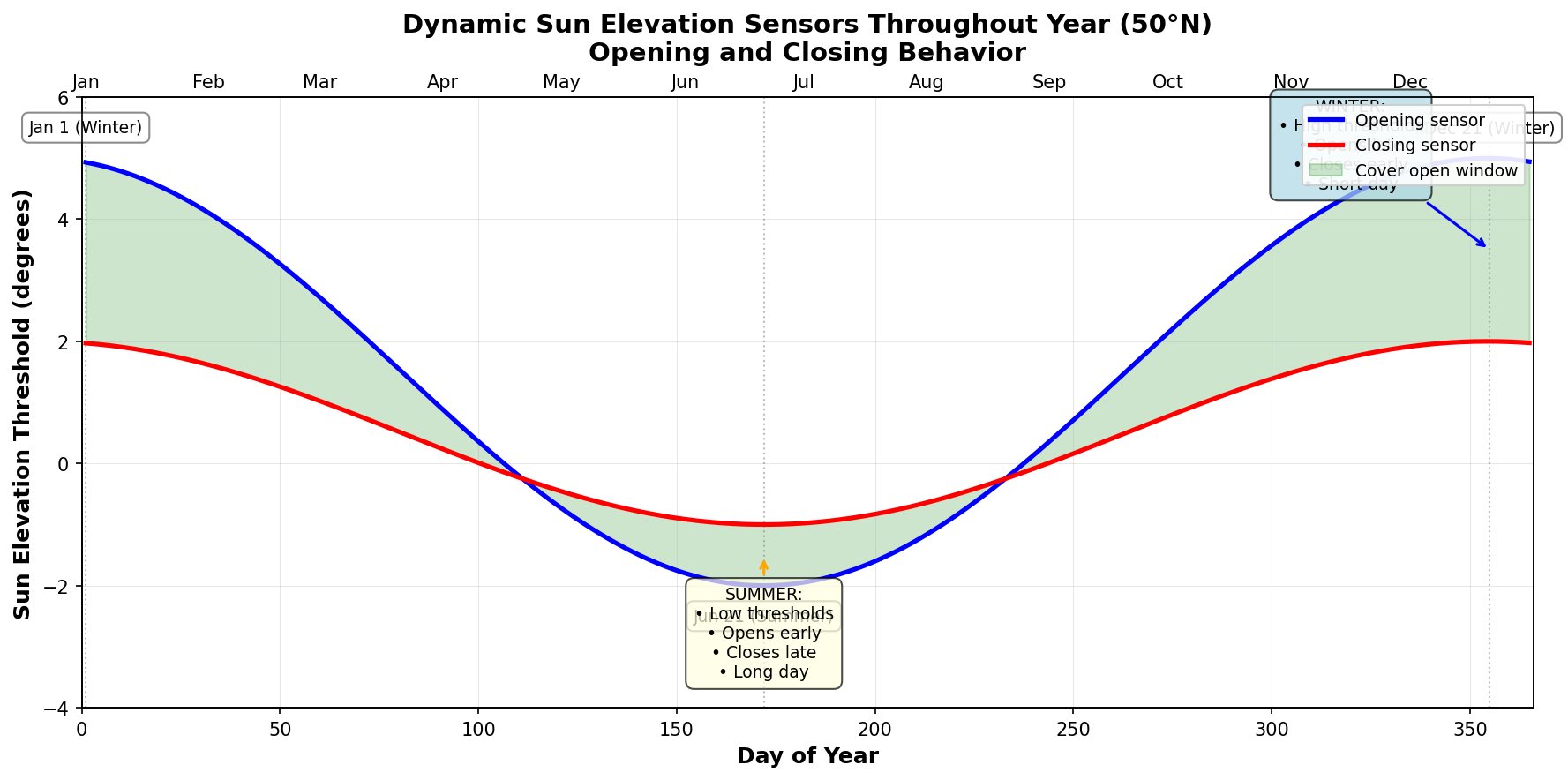
The graph above visualizes how both opening and closing sensors work together throughout the year, creating different “open window” durations in summer vs winter.
Understanding the Comparison Logic
The dynamic sensors provide threshold values that are compared with the current sun elevation:
Opening Logic (Sun Elevation Up):
- ✅ Cover opens when:
current sun elevation > sensor value - 📈 Example: Sensor = 2.5° → Cover opens when sun rises above 2.5°
- 🔄 Seasonal behavior:
- Summer (sensor = -2.0°): Opens earlier (sun can be below horizon)
- Winter (sensor = 5.0°): Opens later (sun must climb higher)
Closing Logic (Sun Elevation Down):
- ✅ Cover closes when:
current sun elevation < sensor value - 📉 Example: Sensor = 0.5° → Cover closes when sun sets below 0.5°
- 🔄 Seasonal behavior:
- Summer (sensor = -1.0°): Closes later (sun can drop below horizon)
- Winter (sensor = 2.0°): Closes earlier (closes before sunset)
Automatic Features
✅ Reads your latitude from zone.home automatically
✅ Calculates optimal thresholds for your location
✅ Interpolates smoothly between summer and winter values
✅ Updates daily to follow sun’s annual path
✅ No maintenance required after initial setup
Reference Values
The sensors use these baseline values for 50°N latitude (Central Europe):
| Sensor | Summer (Jun 21) | Winter (Dec 21) | Range |
|---|---|---|---|
| Opening | -2.0° | 5.0° | 7.0° span |
| Closing | -1.0° | 2.0° | 3.0° span |
Automatic latitude adjustment: ±0.2° per degree difference from 50°N
Values at Different Latitudes
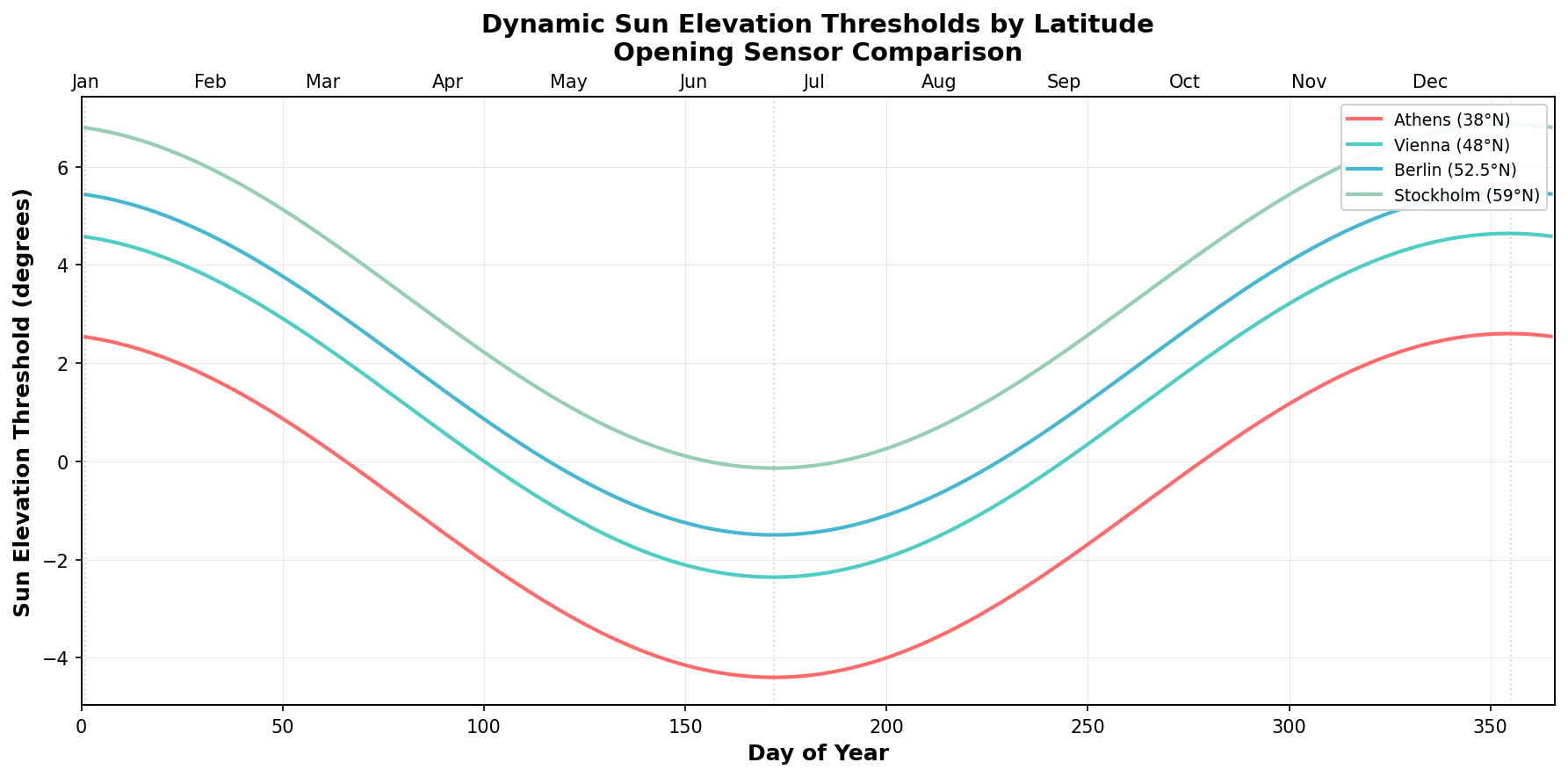
The graph above shows how the opening sensor thresholds automatically adjust for different latitudes across Europe.
| Location | Latitude | Opening Summer | Opening Winter |
|---|---|---|---|
| Tromsø 🇳🇴 | 69.6°N | 1.9° | 8.9° |
| Stockholm 🇸🇪 | 59.3°N | -0.1° | 6.9° |
| Copenhagen 🇩🇰 | 55.7°N | -0.9° | 6.1° |
| Berlin 🇩🇪 | 52.5°N | -1.5° | 5.5° |
| London 🇬🇧 | 51.5°N | -1.7° | 5.3° |
| Paris 🇫🇷 | 48.9°N | -2.2° | 4.8° |
| Vienna 🇦🇹 | 48.2°N | -2.4° | 4.6° |
| Milan 🇮🇹 | 45.5°N | -3.1° | 3.9° |
| Rome 🇮🇹 | 41.9°N | -3.8° | 3.2° |
| Athens 🇬🇷 | 38.0°N | -4.6° | 2.4° |
🔧 Customization
When to Customize
You probably DON’T need to customize if:
- ✅ You live between 40°N and 60°N
- ✅ You want covers to open around sunrise
- ✅ You want covers to close around sunset
You SHOULD customize if:
- ❌ Covers open too early or too late
- ❌ You want specific opening times regardless of sunrise
- ❌ Your latitude is outside 40-60°N range
Method 1: Adjust Reference Values (Recommended)
Modify the summer and winter values to shift timing:
{# Original values #}
{% set summer = -2.0 %}
{% set winter = 5.0 %}

{# Open earlier in morning #}
{% set summer = -4.0 %}   # Lower value = earlier opening
{% set winter = 3.0 %}

{# Open later in morning #}
{% set summer = 0.0 %}   # Higher value = later opening
{% set winter = 7.0 %}
Rule of thumb: Each 1° change shifts timing by approximately 4-6 minutes.
Method 2: Adjust Latitude Factor (Advanced)
Change latitude sensitivity by modifying the 0.2 multiplier:
{# Standard (recommended) #}
{% set adjustment = (lat - 50) * 0.2 %}

{# More aggressive latitude adjustment #}
{% set adjustment = (lat - 50) * 0.3 %}

{# Less aggressive latitude adjustment #}
{% set adjustment = (lat - 50) * 0.1 %}
Method 3: Different Summer/Winter Ratios
Create asymmetric behavior:
{# Aggressive summer (very early), conservative winter #}
{% set summer = -5.0 %}
{% set winter = 3.0 %}

{# Conservative summer, aggressive winter (very late) #}
{% set summer = -1.0 %}
{% set winter = 8.0 %}
🎯 Examples by Use Case
Early Bird Setup (Opens Early)
# Opening sensor
{% set summer = -4.0 %}  # Was: -2.0
{% set winter = 3.0 %}   # Was: 5.0

# Closing sensor
{% set summer = -3.0 %}  # Was: -1.0
{% set winter = 0.0 %}   # Was: 2.0
Effect: Covers open ~30 min earlier, close ~30 min earlier
Night Owl Setup (Opens Late)
# Opening sensor
{% set summer = 0.0 %}   # Was: -2.0
{% set winter = 7.0 %}   # Was: 5.0

# Closing sensor
{% set summer = 1.0 %}   # Was: -1.0
{% set winter = 4.0 %}   # Was: 2.0
Effect: Covers open ~30 min later, close ~30 min later
Maximum Privacy (Stays Closed Longer)
# Opening sensor - very late
{% set summer = 3.0 %}
{% set winter = 10.0 %}

# Closing sensor - very early
{% set summer = 1.0 %}
{% set winter = 5.0 %}
Effect: Minimum exposure time, maximum privacy
Energy Saving (Solar Heat Gain)
# Opening sensor - early to capture morning sun
{% set summer = -5.0 %}
{% set winter = 2.0 %}

# Closing sensor - late to keep warmth inside
{% set summer = -4.0 %}
{% set winter = 0.0 %}
Effect: Opens early (solar gain), closes late (heat retention)
📐 Mathematical Background
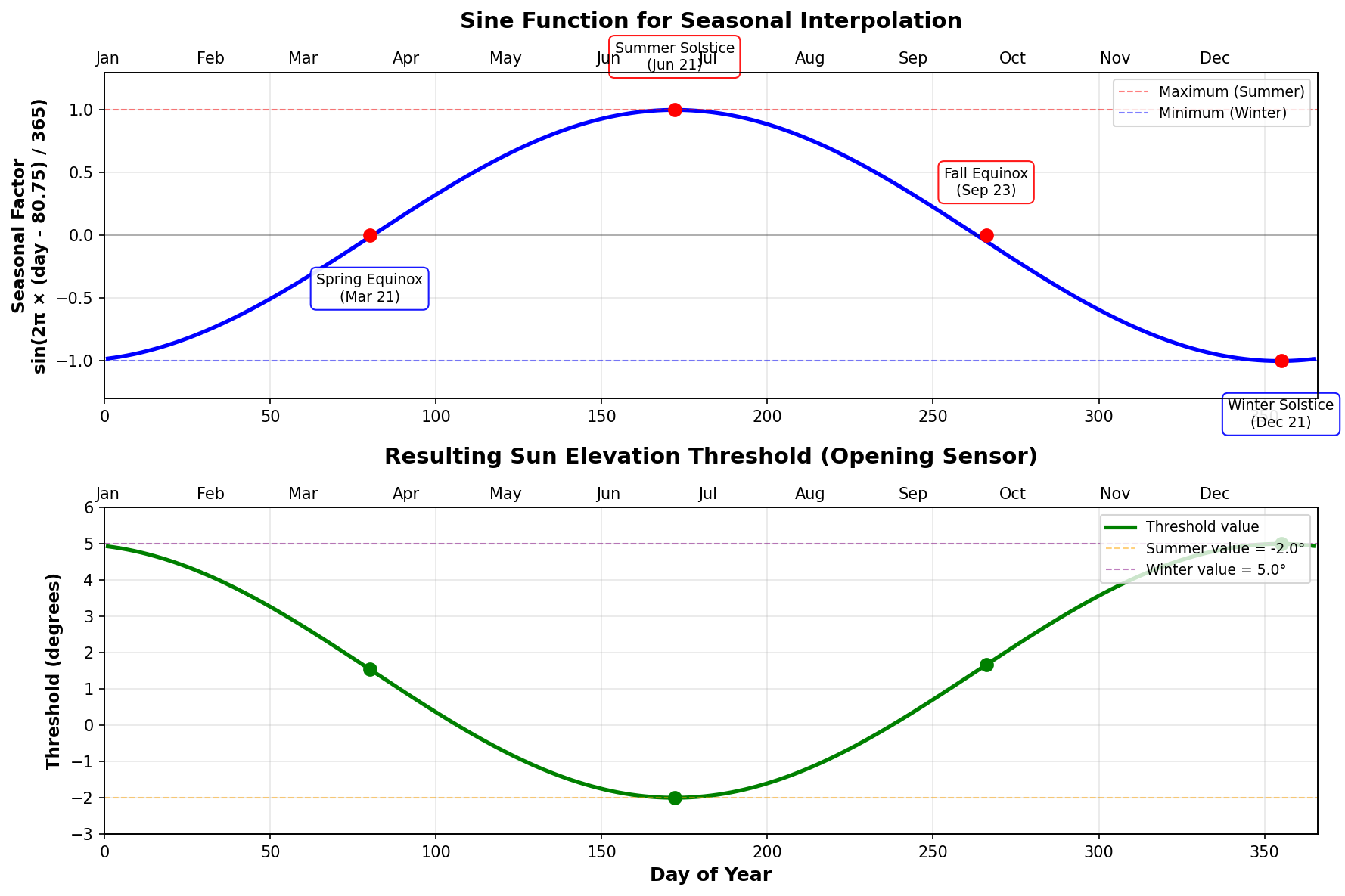
The diagram above shows how the sine function transforms the seasonal cycle into smooth threshold values.
The Sine Formula
elevation = winter + (summer - winter) × (sin(2π × (day - 80.75) / 365) + 1) / 2
Why Day 80.75?
Day 80.75 ≈ March 21 (Spring Equinox)
This is the reference point where:
- ☀️ Sun crosses celestial equator (declination = 0°)
- ⚖️ Day and night are equal length worldwide
- 🌍 Perfect starting point for sinusoidal model
Key Dates in Solar Cycle
        Dec 21 (Day 355)           Jan 1
      MAXIMUM THRESHOLD        MAXIMUM THRESHOLD
              ╲╱                      ╲╱
            ╱  ╲                    ╱  ╲
          ╱      ╲                ╱      ╲
        ╱          ╲            ╱          ╲
     ╱              ╲        ╱              ╲
Mar 21                ╲    ╱                Sep 23
(Day 80)               ╲  ╱                 (Day 266)
EQUINOX                 ╲╱                  EQUINOX
                        ╱╲
                      ╱    ╲
                    ╱        ╲
                  ╱            ╲
                ╱                ╲
              ╱                    ╲
            ╱                        ╲
          ╱                            ╲
        Jun 21 (Day 172)
     MINIMUM THRESHOLD

Note: For threshold values with summer < winter,
      the sine curve is inverted compared to sun's declination
Step-by-Step Calculation
Example: September 20 (Day 263), 52°N (Berlin), Opening sensor
# 1. Get inputs
day = 263
lat = 52.0
summer = -2.0
winter = 5.0

# 2. Calculate seasonal factor
days_from_equinox = 263 - 80.75 = 182.25
radians = 2 × π × 182.25 / 365 = 3.14 rad
sin_value = sin(3.14) ≈ 0.00
seasonal_factor = 0.00

# 3. Calculate base elevation
base = 5.0 + (-2.0 - 5.0) × (0.00 + 1) / 2
base = 5.0 + (-7.0) × 0.5
base = 1.5°

# 4. Apply latitude adjustment
adjustment = (52.0 - 50.0) × 0.2 = 0.4°
final = 1.5 + 0.4 = 1.9°

# Result: Threshold = 1.9° (halfway between summer and winter)
Sine Function Properties
Value Range: -1 to +1

         1.0 ┤     ╭───╮
             │   ╱       ╲
         0.5 ┤ ╱           ╲
             │╱             ╲
         0.0 ┼               ╲     ╱
             │                ╲   ╱
        -0.5 ┤                 ╲ ╱
             │                  ╰
        -1.0 ┤
             └─┬───┬───┬───┬───┬─
              0   π/2  π  3π/2 2π
           (Day 80) (172) (266) (355)
Transformation to 0-1 range:
normalized = (sin_value + 1) / 2
This ensures smooth interpolation between winter (0) and summer (1) values.
🧪 Testing & Verification
Check Current Values
Developer Tools → Template → Test this:
{{ states('sensor.sun_elevation_up_dynamic') }}
{{ states('sensor.sun_elevation_down_dynamic') }}
Should return numbers like: 2.3 and 0.1
Verify Seasonal Changes
Check values at different dates:
{# Current date #}
{{ states('sensor.sun_elevation_up_dynamic') }}

{# Simulate summer (Day 172) #}
{% set day = 172 %}
{% set lat = state_attr('zone.home', 'latitude') | float(50.0) %}
{% set summer = -2.0 %}
{% set winter = 5.0 %}
{% set seasonal_factor = sin(2 * pi * (day - 80.75) / 365) %}
{% set base = winter + (summer - winter) * (seasonal_factor + 1) / 2 %}
{% set adjustment = (lat - 50) * 0.2 %}
{{ (base + adjustment) | round(1) }}
{# Should be close to -2.0° #}

{# Simulate winter (Day 355) #}
{% set day = 355 %}
{# ... same calculation ... #}
{# Should be close to 5.0° (or adjusted for your latitude) #}
Test with Automation
Enable Automation Traces to verify sensor usage:
- Developer Tools → States → Find your CCA automation
- Click ⋮ menu → Traces
- Look for trigger
t_open_5ort_close_5 - Check
value_templateshows sensor value
🐛 Troubleshooting
Sensor shows “unknown” or “unavailable”
Cause: Template syntax error or missing zone.home
Solution:
- Check Configuration → Logs for template errors
- Verify
zone.homeexists in Developer Tools → States - Check latitude is valid:
{{ state_attr('zone.home', 'latitude') }}
Values seem incorrect
Cause: Default values don’t match your preferences
Solution: Adjust summer/winter reference values (see Customization)
Covers open/close at wrong times
Diagnosis table:
| Problem | Current Threshold | Action |
|---|---|---|
| Opens too early | Too low (e.g., -3°) | Increase summer/winter values |
| Opens too late | Too high (e.g., +8°) | Decrease summer/winter values |
| Closes too early | Too high (e.g., +5°) | Decrease summer/winter values |
| Closes too late | Too low (e.g., -6°) | Increase summer/winter values |
Automation not using sensors
Check:
- ✅ Sensors exist and show numeric values
- ✅ CCA automation configured with sensor entities
- ✅ CCA version supports dynamic sensors (2025.XX.XX+)
- ✅ Fixed values in CCA are not set to same values as sensors
Sensors not updating
Normal behavior: Sensors update when:
- Home Assistant restarts
- Template system recalculates (periodic)
- Manual automation reload
Not needed: Sensors don’t need to update more than once per day - daily changes are gradual.
🌐 Regional Adaptations
Northern Europe (55-70°N)
Extreme seasonal variation requires wider range:
# Opening sensor
{% set summer = -5.0 %}  # Much lower minimum
{% set winter = 7.0 %}   # Much higher maximum

# Closing sensor
{% set summer = -4.0 %}
{% set winter = 3.0 %}
Mediterranean (35-45°N)
Less variation, higher year-round sun:
# Opening sensor
{% set summer = -4.0 %}  # Lower baseline
{% set winter = 8.0 %}   # Higher baseline

# Closing sensor
{% set summer = -2.0 %}
{% set winter = 4.0 %}
Southern Hemisphere
Invert the seasons by adding 182.5 days (6 months):
{% set seasonal_factor = sin(2 * pi * (day - 80.75 + 182.5) / 365) %}
This shifts the curve so:
- Maximum in December (summer)
- Minimum in June (winter)
📚 Advanced Topics
Non-Linear Latitude Adjustment
For extreme latitudes, use quadratic adjustment:
{% set lat_diff = lat - 50 %}
{% set adjustment = lat_diff * 0.2 + (lat_diff ** 2) * 0.01 %}
This increases sensitivity at higher/lower latitudes.
Monthly Lookup Tables
For maximum control, use discrete monthly values:
{% set month = now().month %}
{% set monthly_values = {
  1: -2.0, 2: -1.0, 3: 1.0, 4: 3.0,
  5: 4.5, 6: 5.0, 7: 4.5, 8: 3.0,
  9: 1.0, 10: -1.0, 11: -1.5, 12: -2.0
} %}
{{ monthly_values[month] }}
Hysteresis Integration
Add hysteresis to prevent rapid oscillation:
# In CCA configuration
Sun Elevation Up: 5.0°
Brightness Hysteresis: 1000 lx  # Add this for stability
Hysteresis is handled by CCA, not in the sensors.
💡 Pro Tips
1. Start Conservative
Use default values for 1-2 weeks before adjusting. This helps you understand baseline behavior.
2. Adjust in Small Steps
Change values by ±0.5° to ±1.0° at a time. Large changes can cause unexpected behavior.
3. Seasonal Tuning
Fine-tune in spring/autumn (equinoxes) when changes are fastest. This ensures good behavior year-round.
4. Consider Obstacles
Account for buildings, trees, hills:
# Blocked sunrise by building - delay opening
{% set summer = 1.0 %}  # Higher = later
{% set winter = 7.0 %}
5. Different Sensors Per Room
East-facing rooms might need different values than west-facing:
# East (morning sun) - open earlier
sensor.sun_elevation_up_dynamic_east:
  {% set summer = -4.0 %}
  {% set winter = 3.0 %}

# West (evening sun) - open later
sensor.sun_elevation_up_dynamic_west:
  {% set summer = 0.0 %}
  {% set winter = 7.0 %}
6. Combine with Time Constraints
Use CCA’s time windows to limit operation:
Time Up Early: 06:00
Time Up Late: 10:00
+ Dynamic Sensor
= Opens between 06:00-10:00 when sun reaches threshold
7. Monitor with Graphs
Add sensors to Lovelace dashboard to visualize annual cycle:
type: history-graph
entities:
  - sensor.sun_elevation_up_dynamic
  - sensor.sun_elevation_down_dynamic
  - sun.sun
hours_to_show: 168  # 1 week